
The West African Examinations Council has officially released the results of the 2026 West African Senior School Certificate Examination for School Candidates.
WAEC announced the release on Wednesday, August 5, 2026, directing candidates to generate their result-checking PIN before proceeding to check their grades on the official WAEC Direct portal.
If you participated in the 2026 May/June WASSCE, you can now retrieve your serial number and PIN, check your result and download your WAEC identification card online.
WAEC Releases 2026 Results for School Candidates
In its official announcement, WAEC stated that the 2026 WASSCE results for school candidates had been released and were now available online.
The Council subsequently published a separate update explaining how candidates can obtain the serial number and PIN required to check their results.
This means you may need to retrieve your PIN online before visiting the WAEC result-checking portal.
How to Get Your WAEC 2026 Serial Number and PIN
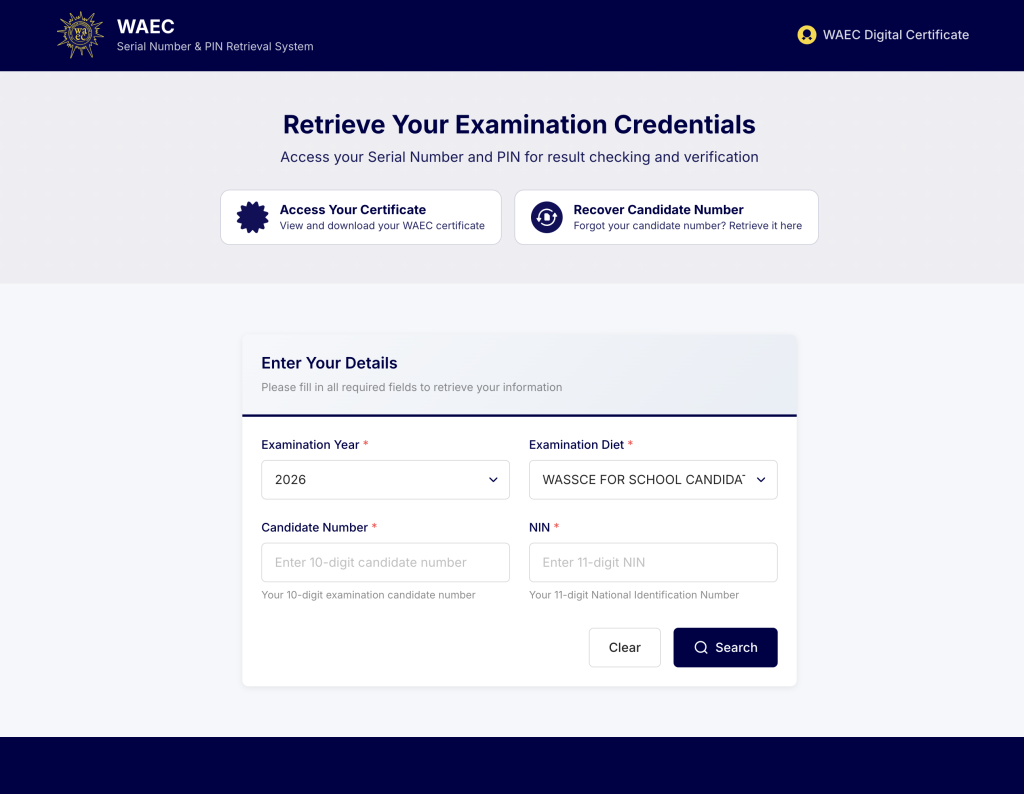
WAEC provided the following steps for candidates who need to retrieve their result-checking details:
- Visit the official WAEC website.
- Select the “Serial Number and PIN” option displayed at the top of the website.
- Choose the appropriate examination year and examination diet.
- Enter your WAEC examination number and National Identification Number.
- Provide your active email address and phone number to receive a one-time password.
- Enter the one-time password to retrieve your serial number and PIN.
WAEC emphasised that the NIN entered must be the same one used when you registered for the 2026 examination. Candidates can also download their WAEC identification cards to their mobile devices after completing the process.
Details You Need to Retrieve Your WAEC PIN
Before starting the process, make sure you have:
- Your WAEC examination number
- The NIN used during your WAEC registration
- An active email address
- An active phone number
- Access to the phone number or email address for OTP verification
Do not use another person’s NIN or a different NIN from the one submitted during your registration, as this may prevent the system from retrieving your information.
How to Check Your 2026 WAEC Result Online
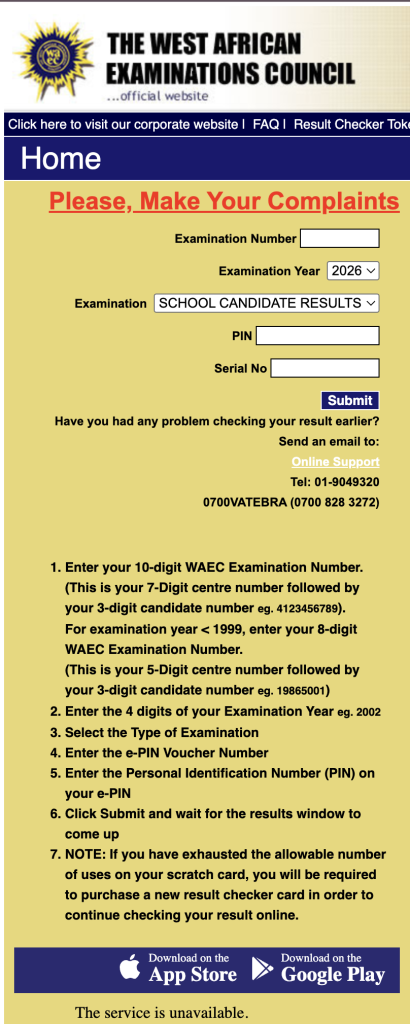
After successfully retrieving your serial number and PIN, follow these steps:
- Visit the official WAEC Direct result-checking portal.
- Enter your 10-digit WAEC examination number.
- Select 2026 as the examination year.
- Choose WASSCE for School Candidates as the examination type.
- Enter your serial number.
- Enter your result-checking PIN.
- Confirm that all the information provided is correct.
- Click the submit button and wait for your result to appear.
WAEC Direct requires a candidate’s examination number, examination year, examination type, serial number and PIN before displaying the result. A candidate’s 10-digit examination number consists of the seven-digit centre number followed by the three-digit candidate number.
Can You Download Your WAEC ID Card?
Yes. WAEC stated that candidates can download their WAEC identification cards to their mobile devices while retrieving their serial numbers and PINs.
The identification card can help you confirm important information such as your examination number, name, photograph and examination details.
Save the downloaded card somewhere secure on your phone and consider keeping another copy in your email or cloud storage.
What to Do If the WAEC Result Portal Is Not Opening
The result-checking website may become slow because many candidates will attempt to check their results at the same time.
When this happens:
- Confirm that your internet connection is working.
- Refresh the page after a few minutes.
- Try another browser.
- Switch between mobile data and Wi-Fi.
- Attempt to check the result during a less busy period.
Do not repeatedly submit the form if the page is still loading, as this may produce an error.
What to Do If Your PIN Cannot Be Retrieved
If you cannot retrieve your serial number and PIN, first confirm that:
- You selected the correct examination year.
- You selected WASSCE for School Candidates.
- Your examination number is correct.
- The NIN entered is the same one used for registration.
- Your phone number and email address are active.
- You entered the correct OTP.
You should contact your school’s examination officer or an official WAEC office if the problem continues.
What “No Result for This Candidate” May Mean
Receiving a message that no result is available does not automatically mean that you failed the examination.
The message may appear because:
- Your examination number was entered incorrectly.
- You selected the wrong examination year.
- You selected the wrong examination type.
- Your result has not yet been fully uploaded.
- Your result is being investigated or withheld.
- The portal is experiencing a temporary technical problem.
Check all the details carefully before submitting the form again.
Beware of Fake WAEC Result Agents
Candidates should use only WAEC’s official website and result-checking portal.
Do not give your examination number, NIN, serial number, PIN or OTP to strangers claiming that they can check, release or upgrade your result.
Nobody on WhatsApp, Facebook, Telegram or any other social media platform can legitimately change a WAEC grade. Anyone promising to upgrade your result in exchange for money is attempting to defraud you.
What to Do After Checking Your WAEC Result
Once your result appears:
- Check your name and examination number.
- Review the grade recorded for each subject.
- Take a clear screenshot of the result.
- Download or print a copy for future use.
- Keep your serial number and PIN private.
- Upload the result to the JAMB portal if you are seeking admission and have not already uploaded it.
You should also confirm that you possess the required O’Level subjects for your selected course and institution.
Most admission processes require credit passes in five relevant subjects, usually including English Language and Mathematics, although the exact requirements depend on the course and institution.
Final Note to 2026 WAEC Candidates
The 2026 WASSCE results for school candidates are now available.
Your first step is to visit WAEC’s official website and retrieve your serial number and PIN using your examination number and the NIN submitted during registration.
After retrieving the details, proceed to the official WAEC Direct portal to check, save and print your result.
Very good
G d s s government day sarkin kudu sabon layi
Kwara State school for special needs Ilorin
How results from out WAEC release
How far the results